
Click to Chat for Meta adverts, WhatsApp BSUID support, a new Responded status, journey hierarchies and faster performance across the platform.
Turn Facebook and Instagram adverts into WhatsApp conversations with Click to Chat
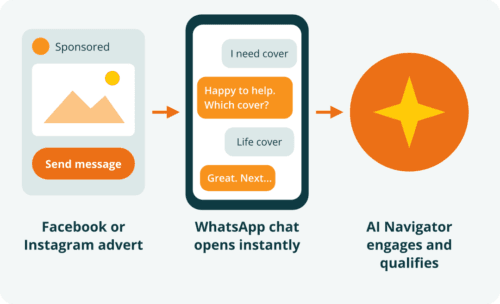
Click to Chat now supports Facebook and Instagram adverts that open a WhatsApp conversation with your business. When a prospect taps your advert, they land directly in a WhatsApp chat, and AI Navigator takes over the engagement from the first message.
Use this to shorten the path from advert impression to qualified conversation. Instead of sending prospects to a landing page or form where many drop off, you can start a conversation in the channel they already use every day. AI Navigator answers questions, captures the information you need and moves the prospect into the right journey in inQuba.
Because every interaction is recorded against the customer’s journey, you can see which campaigns and adverts produce conversations, which conversations convert, and where prospects stall. This gives your marketing and sales teams a single view of advert performance that runs all the way through to outcome.
Research from Forrester showed that return on ad spend (ROAS) was higher with adverts that click to WhatsApp than with legacy adverts.
64%
improvement in ROAS from adverts that click to WhatsApp, compared with legacy adverts
90%
of retail and e-commerce organisations surveyed saw improved ROAS with WhatsApp
Keep reaching every WhatsApp customer with BSUID support
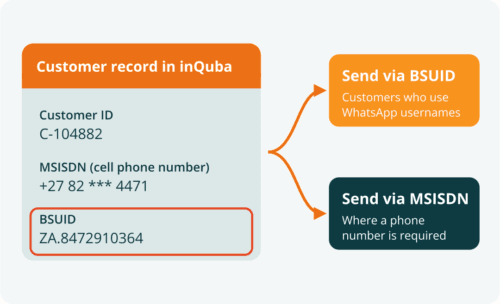
WhatsApp is introducing optional usernames, which let customers message businesses without revealing their phone number. To make sure businesses can still recognise and reach these customers, Meta has introduced the Business-Scoped User ID (BSUID). A BSUID is a persistent identifier that is unique to each pairing of a WhatsApp user and a business portfolio (in other words, your business), so it identifies the customer to your business only (Meta documentation). inQuba now collects BSUIDs automatically as customers interact.
This matters because a growing share of your customers may reach you without a phone number attached. If your platform can only address customers by MSISDN (cell phone number), those conversations become anonymous and you lose the link to the customer’s history and journey.
inQuba 11.0 stores the BSUID against the customer record in the inQuba platform alongside the MSISDN. You can then send messages using either the BSUID or the MSISDN, depending on what is available and what the message requires. Use the BSUID to continue conversations with customers who have adopted usernames, and use the MSISDN where a phone number is required. Your journeys keep running and your customer view stays complete as WhatsApp usernames roll out.
Measure engagement with the new Responded status
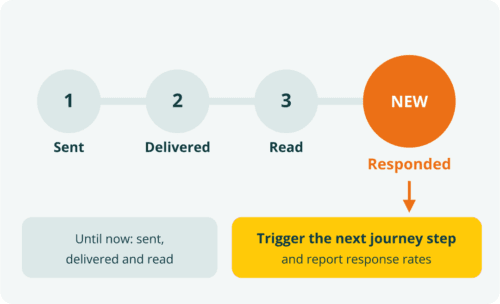
Notifications in inQuba now carry a Responded status, which is set when a customer replies to a message you have sent. Until now, you could see whether a message was sent, delivered and read. You can now also see whether it prompted the customer to act.
Use the Responded status to judge which messages and templates actually start conversations, and to trigger the next step in a journey as soon as a customer replies. You can also report response rates by campaign, journey or channel, so your teams can refine message content and timing based on real engagement rather than read receipts alone.
Model the full customer lifecycle with journey hierarchies
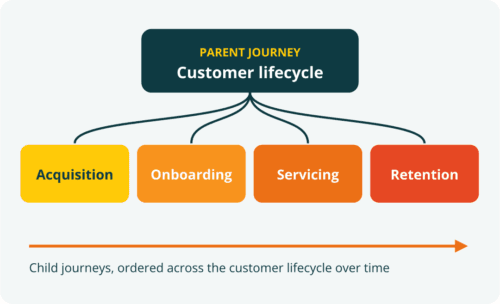
inQuba 11.0 introduces a journey hierarchy that defines how journeys relate to one another. You can now place individual journeys beneath a parent journey, so that each journey is understood in the context of the larger customer story it belongs to.
Use journey hierarchies to build lifecycle journeys that show how a customer moves through your business over time. For example, an insurance lifecycle journey might be structured as follows:
- Customer lifecycle
- Acquisition, including advert response, quote and application
- Onboarding, including policy issue, welcome and first premium
- Servicing, including claims, policy changes and renewals
- Retention, including lapse prevention and win-back
With this structure in place, you can see where each customer sits in their lifecycle, measure performance at both the lifecycle and individual journey level, and identify which stages are driving or losing value. It also makes it easier for teams who own different journeys to understand how their work affects the customer relationship with your brand over time.
Put AI Navigator to work across more of the customer journey
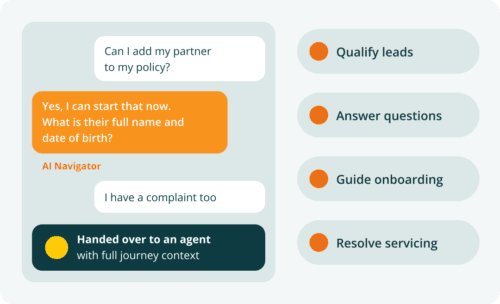
AI Navigator continues to extend across the inQuba platform, and its integration with Click to Chat is the clearest example in this release. Every conversation that starts from a Facebook or Instagram advert can now be handled by AI Navigator from the first reply, so your prospects receive an immediate, relevant response at any time of day.
AI Navigator operates within your journeys rather than alongside them. It uses journey context to decide what to say next, records each interaction in inQuba, and hands over to your agents when a human is needed. In regulated industries such as financial services and insurance, this means AI-driven conversations remain fully auditable as part of the customer’s journey record.
Use AI Navigator to qualify leads, answer product questions, guide customers through onboarding and resolve routine servicing requests, so that your people can focus on the conversations that need them most.
Benefit from faster performance across the platform
We have made architectural changes in inQuba 11.0 that improve performance across the platform. These changes support the growing volume of real-time events, conversations and AI-driven interactions that our clients run through inQuba every day.
Your teams will see more responsive dashboards and journey views, and your journeys will process events and trigger actions with less delay as volumes grow. No changes are required on your side to benefit from these improvements.
Get started with inQuba 11.0
Contact your inQuba account executive to plan how these capabilities fit your roadmap. If you have not implemented AI Navigator, that is a great place to start. Extend your marketing initiatives by running a Click to Chat campaign powered by AI Navigator, and measure the impact on conversion directly. Our team can also help you design a journey hierarchy that reflects your customer lifecycle.
About inQuba Journey Management
Customer Journey Management is the laser technology of CX. Lasers offer targeting precision for specific use cases, and users have granular control. Similarly, managing customer journeys allows you to focus on the specific – cohorts, behaviors and use cases. Every systematic action is for someone, not everyone.
While CX results are flattening, inQuba Journey Management, which includes Journey Analytics and Journey Orchestration, is helping businesses to visualize actual journeys, understand their emotion, dynamically clear their paths, nudge them in the right direction and double customer conversion.
We’d love to understand your business challenges better, and discuss how Journey Management can transform your customers’ experiences and business growth.